
In this busy life we don’t have enough time to complete works, We should do works smarter to complete them easily. Anyway time is valuable and precious to everyone.
Here I give a 10 tips to save time while using smartphone and while using PC in browse
TIP NO – 1
Search Google with A Right-Click
While browsing on internet we find a key words and we like to know them about, and we do search on google with that word , That thing wastes our time a lot , by right click on that word we get an option search this word in google.
we can know by clicking that

TIP NO -2
USE SPACE BAR TO SCROLL PAGE UP AND DOWN
While using your laptop and browsing your files sometimes you may search for a file in a folder which is full of documents then you need to scroll down to get your file and you will scroll using your scrollbar , that may destroy your time . Instead you can scroll your page by clicking space bar to scroll our page that may save your time a lot.
TIP NO -3
USE PASSWORD MANAGER TO LOGIN
You visit many websites and may need to login. And filling login details ill destroy your time.
By using password managers you can save your time. Generally password managers stores login data in your device and some of them are safe to use .
here I recommend some password managers to use.
1.Lastpass
2.Dashlane
3.keeper
4.Roboform
5.1Password
6.Sticky Password
Some of these are free to use they are non paid and some are paid and should aid to use them.
TIP NO -4
Put Important one on our Homesscreen
In your smartphone there are many apps to use. We install lots of apps to use. But we have some of them are important . And we need them to operate several times in a day , But it is a time taking task to search for that and opening that . Putting that app in home screen takes less time to access that particular app. Here you can save a little bit time.
TIP NO -5
USE “SITE:” to find a content in a single site
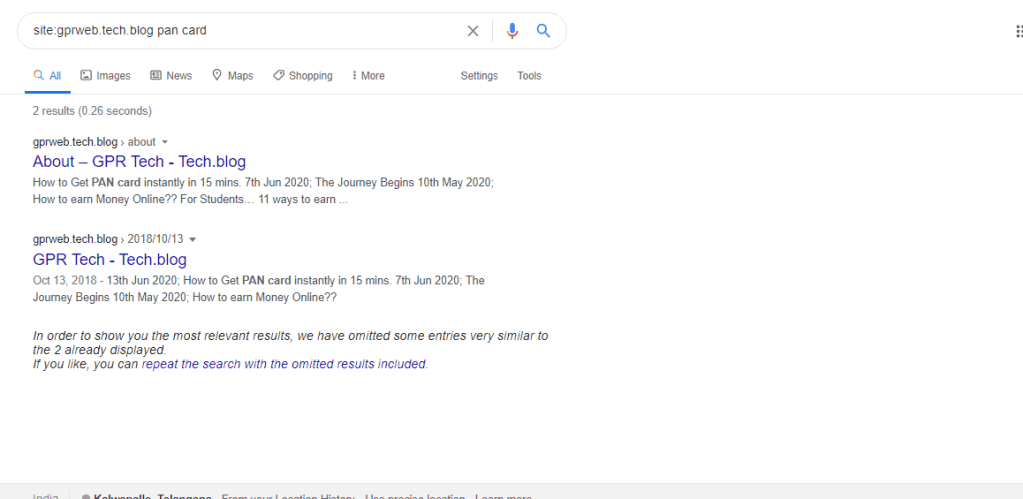
We follow many sites and we read a lot . If you’re searching for something in a site but don’t want to look for results in just any old website, try the search engine’s “Site:” command. In Search box, type “site:” followed with no space by the site of your choosing. For example, “site:gprweb.tech.blog pan card” without the quotation marks. You can then add a query after the URL and press Enter. Google will then only display relevant results from the site of your choosing.
Here I show my site queries
TIP NO -6
SCAN DOCUMENTS FROM YOUR PHONE
We need to get our files in our computer , for that we use scanners and scan them and crop them and save them . This procedure takes a lot time . Using your mobile phone camera for scanning will saves your time a lot and reduces the procedure.
I recommend CAMSCANNER application for your phone to scan files.
TIP NO -7
QUICKLY ACCESS YOUR CAMERA BY SWIPING LEFT ON LOCKSCREEN
In our smartphones we access camera . For that we unlock screen and open that. Instead of that If we turn on the shortcut that swipe left to open camera, almost all smartphones have this option including i phones check your phone settings for that. And this will takes less time and takes less time to access your camera and save time.
TIP NO -8
TAP CALL BUTTON TO REDIAL THE LAST CALL
We usually call our friends and sometimes it is needed to call them immediately and for that we search contact again and dial it. This process destroy your time a lot but tapping call button to redial it saves your time .
TIP NO -9
USE TAB KEY TO SCROLL THROUGH FORMS
We generally fill forms of different purposes. After filling one thing we jump to another by clicking on it . Pressing TAB key will let you to jump next one .
This will save your time .
TIP NO -10
USE ALT-TAB TO SWITCH OVER APPLICATIONS.
While using computer we move over other applications . And we click minimize to move to other app. Using ALT+TAB shortcut can able to switch to other applications easily. Time saved here by using.
Thank you for visiting my blog
Gande.Prudvi
 GPR Tech